

AI-Powered Lead Generation

Qualified B2B Leads
Delivered Daily.

Qualify AI discovers, qualifies, and delivers high-intent B2B leads in your industry – while you focus on closing deals.

2,400+

Leads / Month

87%

Deliverability

24h

Setup Time

Powering outreach for teams using

Apollo.io

HubSpot

Salesforce

Pipedrive

n8n

LinkedIn

The Problem

Why Sales Teams Struggle

Manual prospecting wastes time, burns budgets, and floods your pipeline with bad-fit leads.

⏱ Wasted Time

"Sales reps spend 60% of their time searching for leads instead of selling."

AI discovers and qualifies leads in your ICP 24/7 — no manual searching.

🎯 Poor Targeting

"Cold outreach to unqualified prospects delivers less than 2% response rates."

Personalized AI-written messages based on each lead's role, company, and pain points.

📋 Manual Chaos

"Spreadsheets and scattered tools make lead management a full-time nightmare."

One dashboard. Every lead scored, ranked, and ready for your one-click approval.

How It Works

From ICP to Inbox in 4 Steps

A fully automated pipeline — you only decide who gets the email.

Step 01

Define Your ICP

Tell us who you sell to once. Industry, company size, job titles, and the pains you solve — our AI turns it into a precise targeting profile.

  • Plain-English setup, ready in minutes
  • Refine titles, geos, and signals anytime
  • No prospecting lists to build by hand
1
ICP Builder
Industry
SaaS & Technology
Company size
50 – 500 employees
Job titles
VP Sales Head of Growth CRO
AI is learning your ideal customer…
Step 02

AI Finds & Scores Leads

We search Apollo, LinkedIn, and company databases every day. Every prospect is scored on fit and buying signals before it ever reaches you.

  • Only 6/10+ leads make it to your dashboard
  • Scored on seniority, fit, and intent signals
  • Fresh prospects sourced daily, not scraped once
2
New qualified lead
SM
Sarah Mitchell
VP Sales · Northwind Cloud
9.2SCORE
• Hiring 4 SDRs Series B · $40M Perfect ICP fit
Step 03

Review & Approve

Each lead arrives with three personalized email variants and a subject line. Pick one, tweak it if you like, and approve with a single click.

  • 3 ready-to-send variants per lead
  • Edit copy and subject inline
  • You stay in control of every send
3
Approve outreach
Variant A Variant B Variant C
✓ Approve & Send Reject
Step 04

Automated Outreach

Approved leads receive your email and a smart, threaded follow-up sequence via n8n — sent as real replies until the prospect responds.

  • Thread-aware follow-ups that land in context
  • Auto-pauses the moment they reply
  • One-click opt-out keeps you compliant
4
Inbox · Northwind thread
You → Sarah MitchellDay 0
Sarah Mitchell → You• Replied
Day 0 Day 3 Day 7
How your email actually sends

Your outreach goes out from your own mailbox

Qualify AI does not send from a shared server or a lookalike domain. Approved messages leave from the mailbox you already use every day — so replies land in your inbox, the conversation stays on your own domain, and the person receiving it sees the address they expect.

1

Connect your mailbox

Connect the Google Workspace, Gmail or Microsoft 365 account you want to send from. You sign in on Google's or Microsoft's own screen — we never see your password.

2

Approve what goes out

Every lead arrives with a drafted message. Nothing sends until you approve it, or until a campaign you configured yourself approves it on your behalf.

3

It sends as you

The message leaves from your address and a copy lands in your own Sent folder, exactly as if you had written it there. Replies come straight back to you.

What connecting your mailbox actually grantsRead the detail

For Google accounts we request a single Gmail permissionhttps://www.googleapis.com/auth/gmail.send — which lets the platform send a message on your behalf and nothing else. For Microsoft 365 the equivalent is Mail.Send through Microsoft Graph.

That permission cannot:

  • read, search or list anything in your mailbox
  • open, modify or delete your existing messages
  • see your contacts, calendar, files or any other Google service

We deliberately do not request read access. Alongside the send permission we receive only your email address and display name, so we can show you which account is connected and set the correct sender on your messages.

You can disconnect at any time — from your Qualify AI dashboard, which deletes the stored credential immediately, or directly at myaccount.google.com/permissions without involving us at all. Sending stops at once and campaigns on that mailbox pause rather than failing silently.

Qualify AI is operated by Saltvision BV (Belgium, enterprise and VAT number BE 0786.771.552). What we store, for how long, and our commitments under the Google API Services User Data Policy are set out in section 7 of our Privacy Policy.

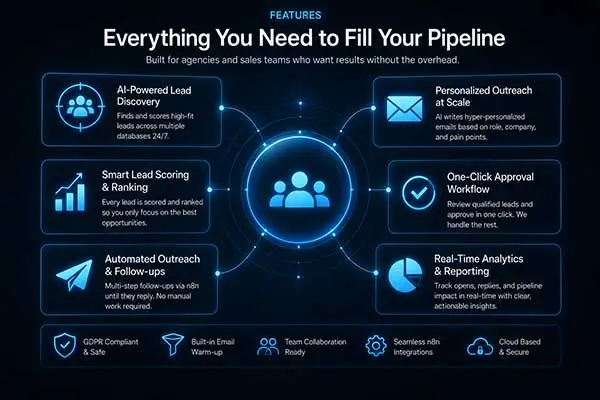
Features

Everything You Need to Fill Your Pipeline

Built for agencies and sales teams who want results without the overhead.

AI Lead Qualification

Every lead is scored on industry fit, seniority, company size, and buying signals. Only 6/10+ leads reach your dashboard.

Multi-Source Discovery

We search Apollo.io, LinkedIn Sales Navigator, company websites, and public databases to find prospects you'd never find manually.

AI-Written Personalization

3 tailored email variants per lead, based on their role, company, and pain points. Edit on the fly or send as-is.

CRM Integration

Seamlessly syncs with HubSpot, Salesforce, and Pipedrive. Approved leads flow directly into your existing workflow.

Email Validation & Deliverability

Every email address is validated before sending. Thread-aware follow-ups reply in context for maximum open rates.

Transparent Dashboard

See accepted leads, rejected leads, email performance, and replies — all in one clean, client-ready view.

Meet Vera

Your AI analyst

He reviews your leads before you've had your coffee.

Why Qualify AI

Replace Your SDR Team with Automation

Predictable Pipeline

Go from zero to automated outreach in 24 hours. No ramp time, no hiring, no missed quota.

AI Precision Targeting

Better targeting, better messaging, better results. Our AI improves with every approved lead.

Zero SDR Costs

Replace 2–3 manual SDRs with automation at a fraction of the cost. Keep your team focused on closing.

Fast Setup, Instant Results

Define your ICP, connect your CRM, and start receiving qualified leads the same day.

Performance vs. Traditional SDR

Lead Quality

92%

Cost Efficiency

85%

Pipeline Speed

78%

Reply Rate

14%

"We replaced our two SDRs with Qualify AI and our qualified pipeline actually grew — by 40% in the first 60 days."

John Doe
Designer

Pricing

Simple, Transparent Pricing

No hidden fees. Cancel anytime.

Starter

$-/month
  • 100 qualified leads per month
  • 30 emails per day (900/month)
  • 1 AI copywriting variant per lead
  • Client approval dashboard
  • Basic analytics

Pro

$-/month
  • 250 qualified leads per month
  • 80 emails per day (900/month)
  • 2 AI copywriting variant per lead
  • Advanced analytics + BI dashboard
  • Priority support

FAQ

Common Questions

A: Our AI scores each lead on industry fit, seniority level, company size, and buying signals. Only leads scoring 6/10 or higher reach your dashboard.

Smiling sales professional reviewing qualified B2B leads from Qualify AI

A: Yes. We integrate with HubSpot, Salesforce, Pipedrive, and most major CRMs via API.

Qualify AI features overview: AI lead discovery, lead scoring, one-click approval, automated outreach, and real-time analytics

A: No. Our AI writes 3 personalized variants for every lead. You can use them as-is or edit before sending.

AI scoring and qualifying B2B leads by fit and buying signals

A: Depends on your ICP and market. Most clients receive 50-150 qualified leads per month.

AI writing personalized cold outreach emails for each B2B lead

A: We continuously search for new prospects. If you exhaust your market, we help you expand your ICP or target adjacent segments.

Sales professional working at a laptop with an AI lead dashboard overlay

No. We ask for one Google permission — gmail.send — which allows the platform to send a message on your behalf and nothing else. It cannot read, search, list, modify or delete anything in your mailbox, and it gives no access to your contacts, calendar or files. For Microsoft 365 the equivalent is Mail.Send through Microsoft Graph.

You sign in on Google’s own screen, so we never see your password, and you can disconnect at any time from your dashboard or from myaccount.google.com/permissions. Full detail is in section 7 of our Privacy Policy.

Ready to Stop Wasting Time on Prospecting?

Let Qualify AI automate your pipeline so you can focus entirely on closing.